Netlist Loading Demonstration
Overview
This document describes a demonstration for loading a circuit netlist into the HeteroSTA timing analysis environment. Two distinct APIs are presented:
-
heterosta_read_netlist: A high-level API for reading a Verilog netlist directly from a file. This is the recommended approach for standard static timing analysis (STA) workflows, such as post-synthesis timing verification or sign-off, where the netlist is the primary source of design information. -
heterosta_set_netlistdb: A flexible, low-level API for advanced users integrating HeteroSTA into a larger toolchain. This method is essential for applications like placement and routing, where an in-memory database already exists. It provides fine-grained control over the internal indices of pins and cells, allowing for a direct and efficient mapping between the host application's data structures and the STA engine.
This guide details both APIs and provides instructions for building and running the included demonstration, which showcases their usage.
API Reference
1. heterosta_read_netlist
bool heterosta_read_netlist(struct STAHoldings *sta, const char *path, const char *top_module);Description
Reads a Verilog netlist from the specified file path and populates the internal design database within the STAHoldings environment. This function must be called after all necessary Liberty library files have been loaded. The top_module parameter controls how the root of the design is determined. As an alternative, the netlist can be provided directly using heterosta_set_netlistdb.
Return Value
Returns true if the netlist file was read and processed successfully. Returns false on failure, which may occur if the file is not found, contains syntax errors, or if a specified top_module does not exist.
Arguments
- sta: A pointer to the
STAHoldingsenvironment that the netlist data will be loaded into. - path: A null-terminated string containing the file path to the Verilog netlist file.
- top_module: A null-terminated string specifying the name of the top-level module. Pass
NULLto enable automatic detection.
2. heterosta_set_netlistdb
void heterosta_set_netlistdb(struct STAHoldings *sta, struct NetlistDB *netlist_ptr);Description
Provides an alternative to heterosta_read_netlist for populating the STAHoldings environment with netlist data. This function directly accepts a pointer to a NetlistDB object that you construct manually. It must be called after all necessary Liberty library files have been loaded.
To use this function, you must first parse the Verilog netlist into a custom data structure. From this data, you then populate a NetlistDBCppInterface struct and call the netlistdb_new() function to create the NetlistDB instance. The required definitions for these items can be found in netlistdb.h. A demo is provided that illustrates the use of this function alongside heterosta_read_netlist. This approach is recommended for advanced users who need fine-grained control over the netlist data structure.
Arguments
- sta: A pointer to the
STAHoldingsenvironment that the netlist data will be loaded into. - netlist_ptr: A pointer to a previously created
NetlistDBobject.
Note on Pin Indexing
A key advantage of this method is control over pin indexing. The internal pin IDs within the STAHoldings environment will directly correspond to the indices you define when constructing the NetlistDBCppInterface. This avoids the need to remap pin indices when interfacing with other functions, such as heterosta_extract_rc_from_placement.
Running the Demonstration
The provided demo implements the two methods in read_netlist_demo.cpp and set_netlistdb_demo.cpp respectively.
Code Structure
The set_netlistdb_demo.cpp uses a simple, two-stage database approach to illustrate the workflow:
NormalPlaceDB: A basic, object-oriented database defined inplacedb.h. A simple Verilog parser inplacedb.cppreads the.vfile and populates this database.FlatPlaceDB: A flattened, array-based representation of the netlist. Data is transferred fromNormalPlaceDBinto this structure, which is ideal for interfacing with the C API. It contains thebuild_netlistdbmethod that prepares the finalNetlistDBobject.
Building the Demo
A Makefile is provided.
Using Makefile:
# Compile the code directly from the root directory
make
This will create two executables: read_netlist_demo and set_netlistdb_demo.
Executing the Demo
-
Run the
read_netlistdemo:./read_netlist_demo -
Run the
set_netlistdbdemo:./set_netlistdb_demo -
View the Database Mapping: To understand how the in-memory arrays map to the original design, run the
set_netlistdbdemo with the--verboseor-vflag../set_netlistdb_demo --verboseThis prints a detailed, Markdown-formatted explanation of the data structures passed to the C API, showing the relationship between array indices and the original pin, net, and cell names.
Example Circuit: simple.v
The demonstration uses the simple.v Verilog file as input. Its circuit structure is illustrated below. The --verbose output directly corresponds to this schematic, helping you trace how each component is represented in the data arrays.
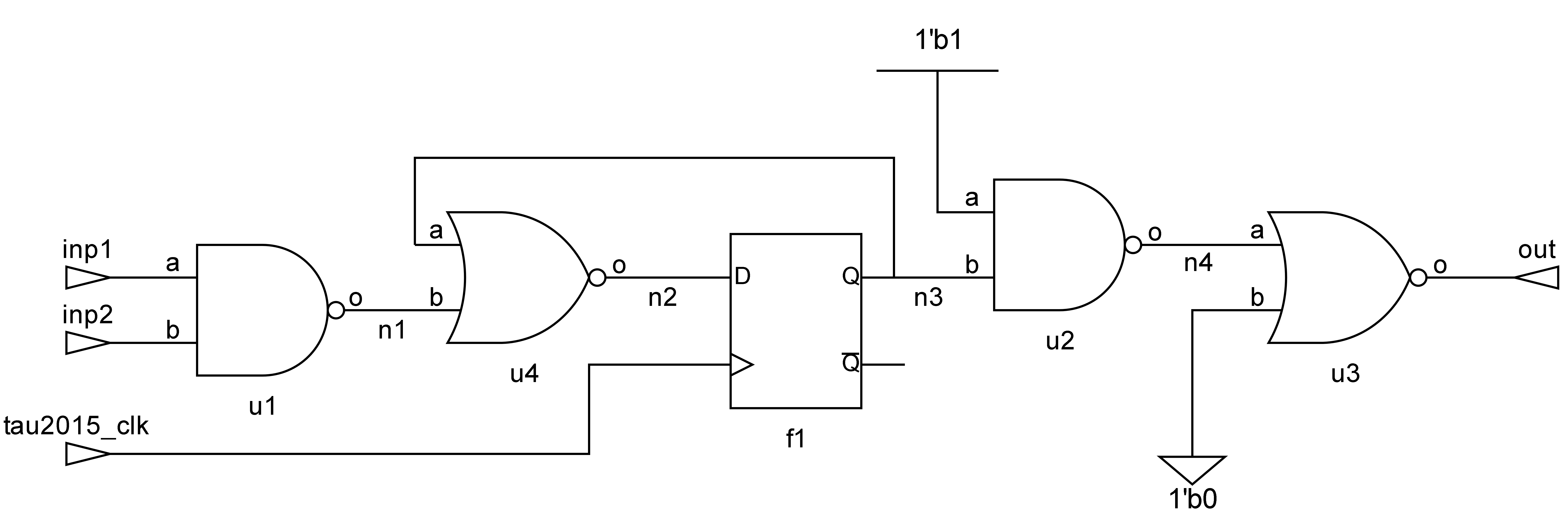
Example --verbose Output
Running ./set_netlistdb_demo --verbose produces the detailed output below, which maps the internal data structures back to the simple.v netlist:
NetlistDB Cpp Interface Data Mapping Explanation
This document explains the mapping from original database names to the integer indices
used in the arrays passed to the NetlistDB C-style interface.
Summary of Database Content
- Top Design Name: simple
- Total Cells (Instances + Top): 6
- Total Pins (Instance Pins + Ports): 19
- Total Top-Level Ports: 4
- Total Nets: 10
1. Cell/Instance Arrays
The cellname_array and celltype_array map a cell index to its instance name and type.
Note: Cell[0] is reserved for the top-level design module.
| Cell Index | cellname_array |
celltype_array |
|---|---|---|
| 0 | simple | |
| 1 | u1 | NAND2_X1 |
| 2 | f1 | DFF_X80 |
| 3 | u2 | NAND2_X1 |
| 4 | u3 | NOR2_X1 |
| 5 | u4 | NOR2_X1 |
2. Net Array
The netname_array maps a net index to its original name in the design.
| Net Index | netname_array |
|---|---|
| 0 | inp1 |
| 1 | inp2 |
| 2 | tau2015_clk |
| 3 | out |
| 4 | n1 |
| 5 | n2 |
| 6 | n3 |
| 7 | n4 |
| 8 | 1'b1 |
| 9 | 1'b0 |
3. Pin and Connectivity Arrays
This table provides a comprehensive mapping for each pin, showing its name, direction, owner cell, and connected net.
| Pin Index | pinname_array |
pindirection_array |
pin2cell_array |
Cell Name | pin2net_array |
Net Name |
|---|---|---|---|---|---|---|
| 0 | u1/a | NetlistDirection::I |
1 | u1 | 0 | inp1 |
| 1 | u1/b | NetlistDirection::I |
1 | u1 | 1 | inp2 |
| 2 | u1/o | NetlistDirection::O |
1 | u1 | 4 | n1 |
| 3 | f1/d | NetlistDirection::I |
2 | f1 | 5 | n2 |
| 4 | f1/ck | NetlistDirection::I |
2 | f1 | 2 | tau2015_clk |
| 5 | f1/q | NetlistDirection::O |
2 | f1 | 6 | n3 |
| 6 | u2/a | NetlistDirection::I |
3 | u2 | 6 | n3 |
| 7 | u2/b | NetlistDirection::I |
3 | u2 | 8 | 1'b1 |
| 8 | u2/o | NetlistDirection::O |
3 | u2 | 7 | n4 |
| 9 | u3/a | NetlistDirection::I |
4 | u3 | 7 | n4 |
| 10 | u3/b | NetlistDirection::I |
4 | u3 | 9 | 1'b0 |
| 11 | u3/o | NetlistDirection::O |
4 | u3 | 3 | out |
| 12 | u4/a | NetlistDirection::I |
5 | u4 | 4 | n1 |
| 13 | u4/b | NetlistDirection::I |
5 | u4 | 6 | n3 |
| 14 | u4/o | NetlistDirection::O |
5 | u4 | 5 | n2 |
| 15 | inp1 | NetlistDirection::O |
0 | 0 | inp1 | |
| 16 | inp2 | NetlistDirection::O |
0 | 1 | inp2 | |
| 17 | tau2015_clk | NetlistDirection::O |
0 | 2 | tau2015_clk | |
| 18 | out | NetlistDirection::I |
0 | 3 | out |
4. Special Net Arrays (Power/Ground)
These arrays list the indices of nets connected to constant power (1) or ground (0).
nets_one_array (Power Nets):
| Index | nets_one_array |
Net Name |
|---|---|---|
| 0 | 8 | 1'b1 |
nets_zero_array (Ground Nets):
| Index | nets_zero_array |
Net Name |
|---|---|---|
| 0 | 9 | 1'b0 |